


After purchase, you can check your product key, redeem code, account details, or subscription access from your K2ZI account.
You can find your delivery details here:
Simple Steps
1. Log In
Go to K2ZI Account Login and sign in with your order email.
You can log in with OTP or Google. If you do not have an account yet, just use the same order email and your account can be created automatically.
2. Open My Orders
If your order is linked to that email, open My Orders and view your order details.
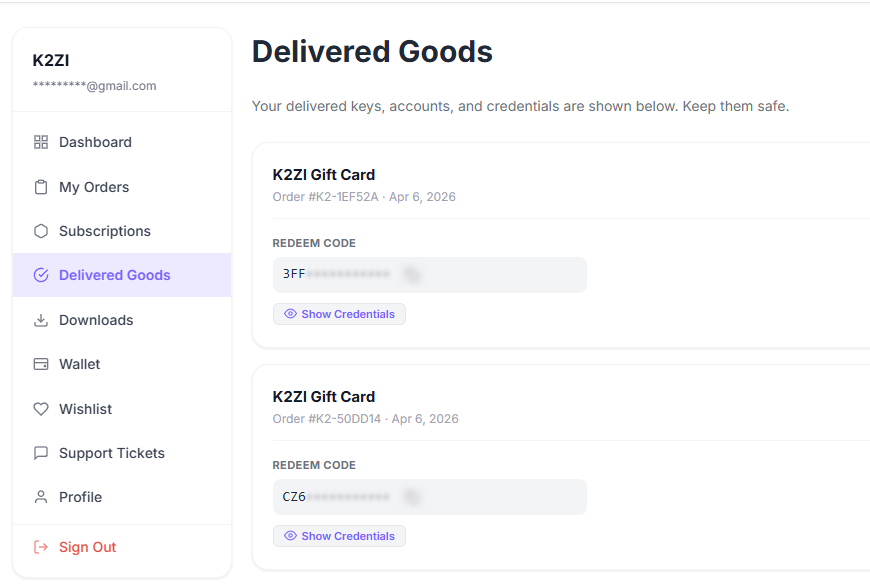
3. Check Delivered Goods
You can also open Delivered Goods to see your delivered keys, redeem codes, and credentials.
4. Check Subscriptions
If you bought a subscription product, visit Subscriptions. Your access details may be shown there as well.
If You Cannot Find Your Details
- Make sure you logged in with the same email used for the order
- Check My Orders, Delivered Goods, and Subscriptions
- Wait a few minutes if your order is still processing
- Contact support if the product is still not visible
Tip: use your order email to log in first. Once logged in, your product credentials are usually easy to find from your order page, delivered goods page, or subscription page.